---
title: "Data"
format:
html: default
revealjs:
output-file: data-slides.html
pdf:
output-file: data-handout.pdf
docx:
output-file: data-handout.docx
---
{{< include shared-config.qmd >}}
# Types of variables
Before summarizing data,
it helps to identify the **type** of each variable,
since the appropriate descriptive methods depend on the type.
Variables are broadly classified as either **numerical** or **categorical**,
and within each class there are important subtypes.
---
:::{#def-numerical-var}
#### Numerical variable
A **numerical** (or **quantitative**) variable is a variable that takes
values on a numeric scale,
where arithmetic operations such as subtraction (and possibly division)
are meaningful.
Numerical variables may be further classified as
[interval](#def-interval-var) or [ratio](#def-ratio-var) variables,
and as [continuous](#def-continuous-var) or [discrete](#def-discrete-var).
Examples: age, blood pressure, cholesterol, number of cigarettes per day.
:::
---
:::{#def-interval-var}
#### Interval variable
An **interval variable** is a numerical variable for which
differences between values are meaningful,
but there is no natural zero point
(so ratios of values are not meaningful).
Example: temperature in degrees Celsius —
a difference of 10°C is meaningful,
but 30°C is not "twice as hot" as 15°C.
:::
---
:::{#def-ratio-var}
#### Ratio variable
A **ratio variable** is a numerical variable with a natural zero point,
so that both differences and ratios of values are meaningful.
Examples: age, weight, cholesterol, blood pressure, number of cigarettes per day —
a value of 0 means complete absence of the quantity.
:::
---
:::{#def-continuous-var}
#### Continuous variable
A **continuous variable** is a numerical variable whose possible values form an
interval (or union of intervals) of real numbers.
A continuous variable is always numerical.
Examples: age, blood pressure, cholesterol, BMI.
:::
---
:::{#def-discrete-var}
#### Discrete variable
A **discrete variable** is a variable whose possible values form a
countable set.
Discrete variables include both **numerical** types
(such as [count variables](#def-count)) and
**categorical** types
(such as binary, nominal, and ordinal variables).
In contrast, continuous variables are always numerical.
Examples: number of cigarettes per day (discrete numerical/count),
CHD event status (discrete categorical/binary).
:::
---
:::{#def-categorical-var}
#### Categorical variable
A **categorical** (or **qualitative**) variable is a variable that takes
values in a finite set of categories,
where arithmetic operations such as differences are not meaningful.
Categorical variables may be **nominal** (unordered) or **ordinal** (ordered),
and are always discrete.
Examples: behavioral pattern (Type A1, A2, B3, B4),
race/ethnicity, self-reported health status.
:::
---
:::{#def-nominal-var}
#### Nominal variable
A **nominal variable** is a categorical variable whose categories have
no natural ordering.
Examples: behavioral pattern (Type A1, A2, B3, B4),
race/ethnicity, blood type.
:::
---
:::{#def-ordinal-var}
#### Ordinal variable
An **ordinal variable** is a categorical variable whose categories have a
natural ordering.
Examples: self-reported health (poor, fair, good, very good, excellent),
weight category.
:::
---
:::{#def-binary-var}
#### Binary variable
A **binary variable** takes only two possible values,
often coded 0 (absence) and 1 (presence).
A binary variable is a special case of a nominal variable.
Examples: CHD event (yes/no), current smoker (yes/no).
:::
---
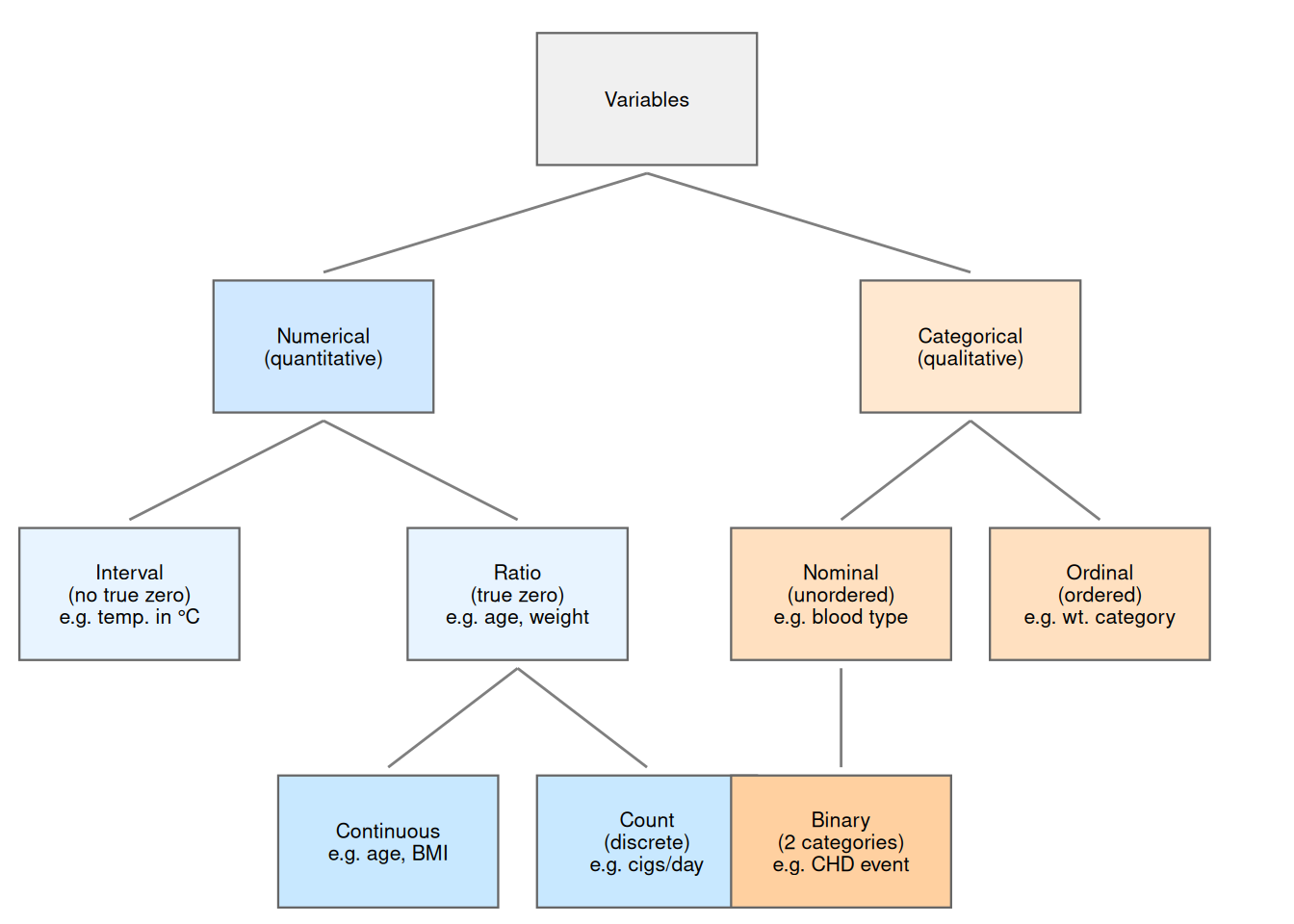
@fig-var-taxonomy illustrates the relationships among these variable types.
::: {#fig-var-taxonomy}
```{r}
#| fig-alt: >
#| Taxonomy of variable types.
#| Variables divide into Numerical (quantitative)
#| and Categorical (qualitative).
#| Numerical variables subdivide into Interval (no true zero) and Ratio
#| (true zero); Ratio variables further divide into Continuous and Count.
#| Categorical variables subdivide into Nominal (unordered) and Ordinal
#| (ordered); Nominal includes Binary as a special case.
nodes <- tibble::tribble(
  ~id,   ~x,    ~y,   ~label,
  "V",    5,    4.5,  "Variables",
  "N",    2.5,  3,    "Numerical\n(quantitative)",
  "C",    7.5,  3,    "Categorical\n(qualitative)",
  "I",    1,    1.5,  "Interval\n(no true zero)\ne.g. temp. in \u00b0C",
  "R",    4,    1.5,  "Ratio\n(true zero)\ne.g. age, weight",
  "CT",   3,    0,    "Continuous\ne.g. age, BMI",
  "CNT",  5,    0,    "Count\n(discrete)\ne.g. cigs/day",
  "NOM",  6.5,  1.5,  "Nominal\n(unordered)\ne.g. blood type",
  "ORD",  8.5,  1.5,  "Ordinal\n(ordered)\ne.g. wt. category",
  "BIN",  6.5,  0,    "Binary\n(2 categories)\ne.g. CHD event"
)
edges <- tibble::tribble(
  ~from, ~to,
  "V",   "N",
  "V",   "C",
  "N",   "I",
  "N",   "R",
  "R",   "CT",
  "R",   "CNT",
  "C",   "NOM",
  "C",   "ORD",
  "NOM", "BIN"
) |>
  dplyr::left_join(
    dplyr::select(nodes, id, x, y),
    by = c("from" = "id")
  ) |>
  dplyr::rename(x_from = x, y_from = y) |>
  dplyr::left_join(
    dplyr::select(nodes, id, x, y),
    by = c("to" = "id")
  ) |>
  dplyr::rename(x_to = x, y_to = y)
fill_colors <- c(
  "V" = "#f0f0f0",
  "N" = "#d0e8ff", "C" = "#ffe8d0",
  "I" = "#e8f4ff", "R" = "#e8f4ff",
  "CT" = "#c8e8ff", "CNT" = "#c8e8ff",
  "NOM" = "#ffe0c0", "ORD" = "#ffe0c0",
  "BIN" = "#ffd0a0"
)
ggplot2::ggplot() +
  ggplot2::aes() +
  ggplot2::geom_segment(
    data = edges,
    ggplot2::aes(
      x = x_from, y = y_from - 0.45,
      xend = x_to, yend = y_to + 0.45
    ),
    color = "grey50"
  ) +
  ggplot2::geom_tile(
    data = nodes,
    ggplot2::aes(x = x, y = y, fill = id),
    width = 1.7, height = 0.8,
    color = "grey40", linewidth = 0.4,
    show.legend = FALSE
  ) +
  ggplot2::geom_text(
    data = nodes,
    ggplot2::aes(x = x, y = y, label = label),
    size = 2.8, lineheight = 0.9
  ) +
  ggplot2::scale_fill_manual(values = fill_colors) +
  ggplot2::scale_y_continuous(
    limits = c(-0.5, 5.1), expand = c(0, 0)
  ) +
  ggplot2::scale_x_continuous(
    limits = c(0, 10), expand = c(0, 0)
  ) +
  ggplot2::theme_void()
```
Taxonomy of variable types.
Count variables are discrete and numerical;
binary, nominal, and ordinal variables are discrete and categorical.
:::
::: {.callout-note}
The continuous/discrete distinction cuts across the
numerical/categorical distinction.
Continuous variables are always numerical.
Discrete variables include both numerical types (e.g., count variables)
and categorical types (e.g., binary, nominal, and ordinal variables).
:::
---
@tbl-wcgs-vartypes shows selected variables from the WCGS dataset and
their types.
```{r}
#| label: tbl-wcgs-vartypes
#| tbl-cap: "Selected WCGS variables and their types"
tibble::tribble(
  ~Variable, ~Description, ~Type, ~Scale,
  "`age`", "Age (years)", "Continuous", "Ratio",
  "`chol`", "Total cholesterol", "Continuous", "Ratio",
  "`sbp`", "Systolic blood pressure", "Continuous", "Ratio",
  "`bmi`", "Body mass index (kg/m²)", "Continuous", "Ratio",
  "`weight`", "Weight (lbs)", "Continuous", "Ratio",
  "`ncigs`", "Cigarettes per day", "Count (discrete)", "Ratio",
  "`chd69`", "CHD event by 1969", "Binary (nominal)", "Nominal",
  "`smoke`", "Current smoking", "Binary (nominal)", "Nominal",
  "`arcus`", "Arcus senilis", "Binary (nominal)", "Nominal",
  "`dibpat`", "Behavioral pattern (A/B)", "Binary (nominal)", "Nominal",
  "`behpat`", "Behavioral pattern (A1/A2/B3/B4)", "Nominal", "Nominal",
  "`wghtcat`", "Weight category", "Ordinal", "Ordinal",
  "`agec`", "Age group", "Ordinal", "Ordinal"
) |>
  knitr::kable()
```
# Random variables
## Binary variables {#sec-binary-vars}
{{< include binary-vars.qmd >}}
---
## Count variables {#sec-count-vars}
{{< include count-vars.qmd >}}
---